
Create and reissue
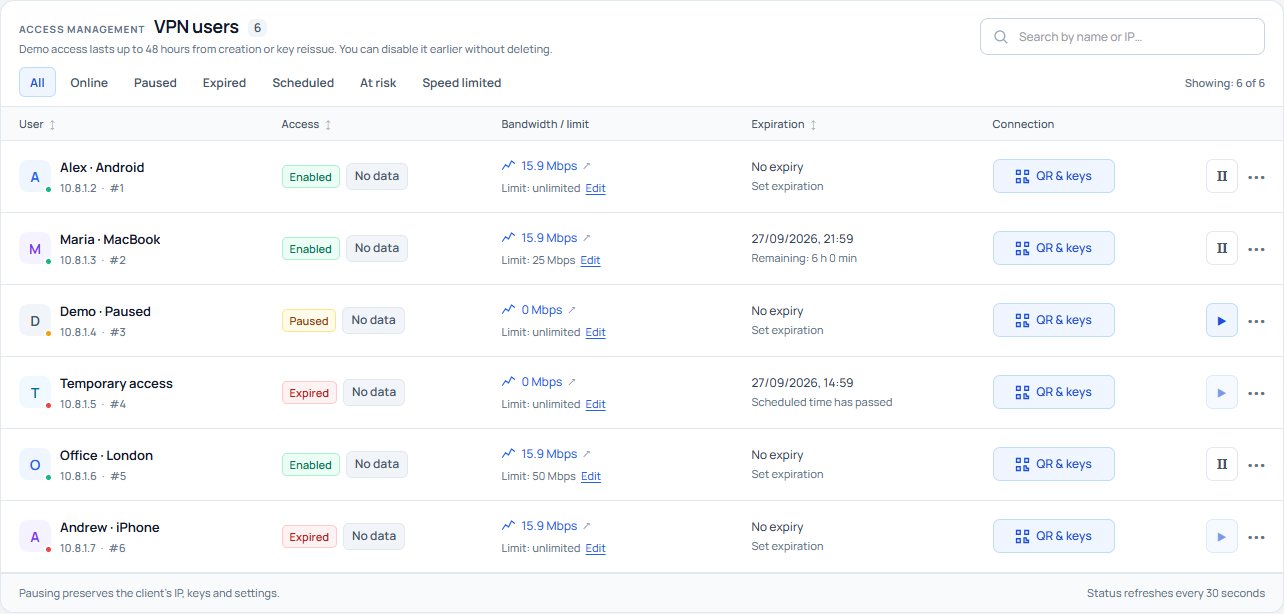
Create VPN users and generate new keys when reissuing access. All the main actions are available from the client list.
Create VPN users, issue Amnezia VPN profiles, set speed limits and manage access expiry in one web control panel.
Tools for administrators, service teams and integrators.
Create VPN users and generate new keys when reissuing access. All the main actions are available from the client list.
Temporarily disable a client while keeping its IP, keys and history. Before access expires, you can enable the connection again with the same profile.
Set an access expiry time. The server disables the connection on schedule, even when the panel is not open in a browser.
Choose dates and zoom into the channel chart. Each user has 12 hours of traffic history; tooltips show the time and speed.
Set individual speed limits and monitor VPN bandwidth usage.
Amnezia text key, QR player, GIF, configuration file or ZIP. Choose the format that suits the client application and device.
Normal, attention, high risk or no data. Open a status to see the details: suspicious activity needs investigation, not an automatic accusation.
Sign-ins, profile issuance, key reissues and access changes. Find events using search and filters.
Email notifications and one-time-code sign-in are available when mail delivery is configured. Some features may be restricted on the public demo.
Four workflows you can try in the demo portal.
Select “New user”, enter a name and open “QR and keys”. Import the QR code or text key into Amnezia VPN; use CONF for a compatible AmneziaWG client.
Pause a connection or set a time to disable it. Pausing keeps the keys but does not extend access. The shared demo area has a 48-hour limit; reissuing creates new keys and starts a new access period.
Enter a limit in Mbps in the user settings. There is no need to change the profile on the device. Leave the field empty or enter zero to remove the limit, then check the client's traffic history.
Choose a period in the channel chart and zoom into a peak. Open a client's history to inspect its traffic over the past 12 hours. Search and filter the activity log for profile issuance, access changes or key reissues.
The demo environment runs AWG 3.1. Use an up-to-date Amnezia VPN application and import the profile supplied by the panel.
Apps for Windows, Android and iPhone →AmneCore is a web control panel for managing VPN users on an Amnezia server: access, keys, statuses, activity logs and channel traffic.
The panel streamlines granting and revoking VPN access, helps you manage access keys, shows active connections, and records operator and user actions for review.
The panel is designed to manage AmneziaWG users. The demo runs AWG 3.1. Before deployment, we check the protocol and application versions used in your infrastructure.
Select “New user”, enter a name and set access expiry if needed. Open the new client’s QR and keys, then import the profile into Amnezia VPN. In the shared demo area, VPN access is limited to 48 hours after creation or reissue.
Pausing disables the connection while preserving the IP, keys, speed limit and history. Before access expires, you can enable it again using the same profile. Pausing does not extend access: after the shared demo area’s 48-hour period ends, you must reissue the profile with new keys.
Enter a limit in Mbps in the user settings. You do not need to reissue the profile. Leave the field empty or enter zero to remove the speed limit.
The channel chart retains 7 days of history and initially shows the last hour. You can choose dates, zoom into a period, and inspect readings on hover or touch. Each client has separate traffic history for the past 12 hours.
QR codes and text keys are for importing into Amnezia VPN. A CONF file is used by a compatible AmneziaWG client. Choose the format that matches the application and device.
AmneCore records activity and helps you pause or reissue access. The risk indicator flags suspicious activity for review, but does not by itself prove profile cloning or the number of connected devices.
Your sign-in details will be sent automatically to the email you provide.